Best free trading journal: the whole journal free, with no trade cap
Astro Trading Journal is the best free trading journal because the free plan is the full journal, with no cap on how many trades you log. Manual entry, analytics, setups and playbooks, trade reflections, Daily Rewind and notes are all free, on iPhone and on the web.
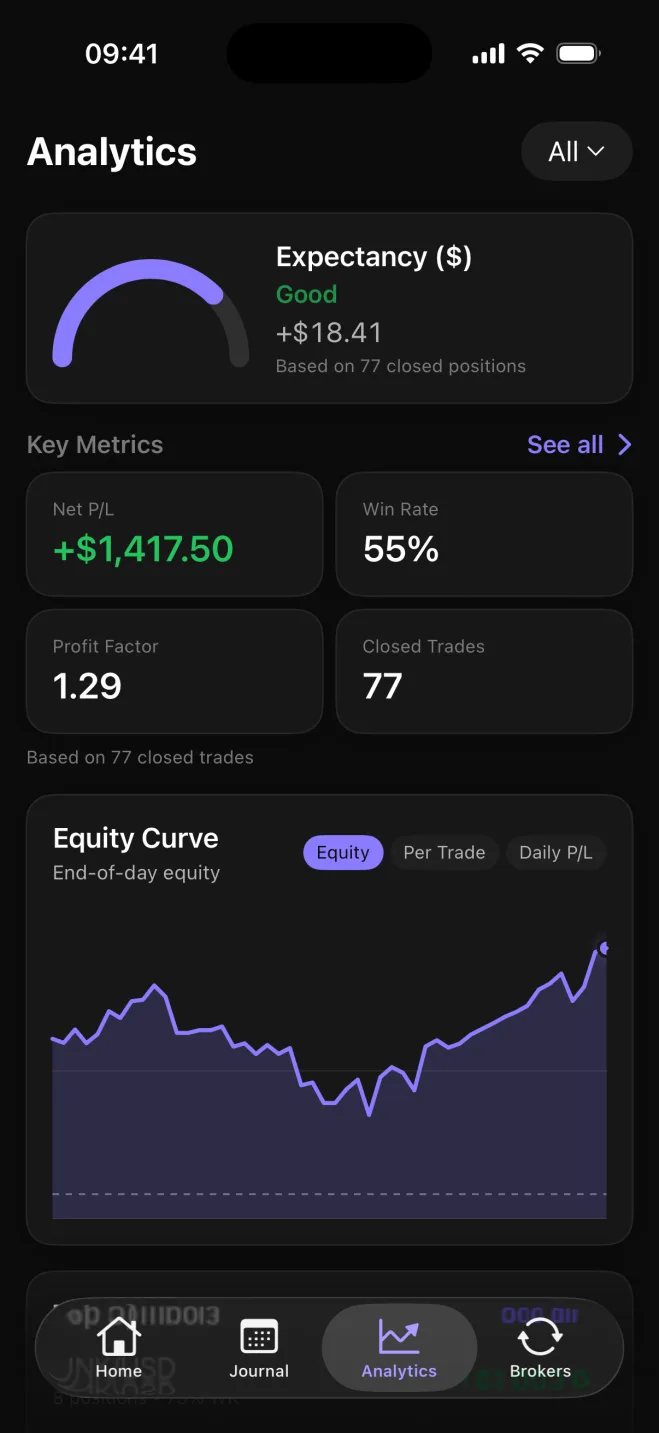
What Astro's free plan includes
| Feature | Plan |
|---|---|
| Manual trade entry, with no trade cap | Free |
| Analytics: net and gross P&L, win rate, average win against average loss, drawdown | Free |
| Breakdowns by symbol, asset class, direction, setup and playbook | Free |
| Setups and playbooks | Free |
| Trade reflections | Free |
| Daily Rewind | Free |
| Notes with images | Free |
| iPhone app and web app on one account | Free |
| AI Reviews | One free review for every account, unlimited with Premium |
| Broker and exchange sync | Premium |
There is no trade, account or time limit on the free plan, so a trader closing thirty trades a week logs all of them.
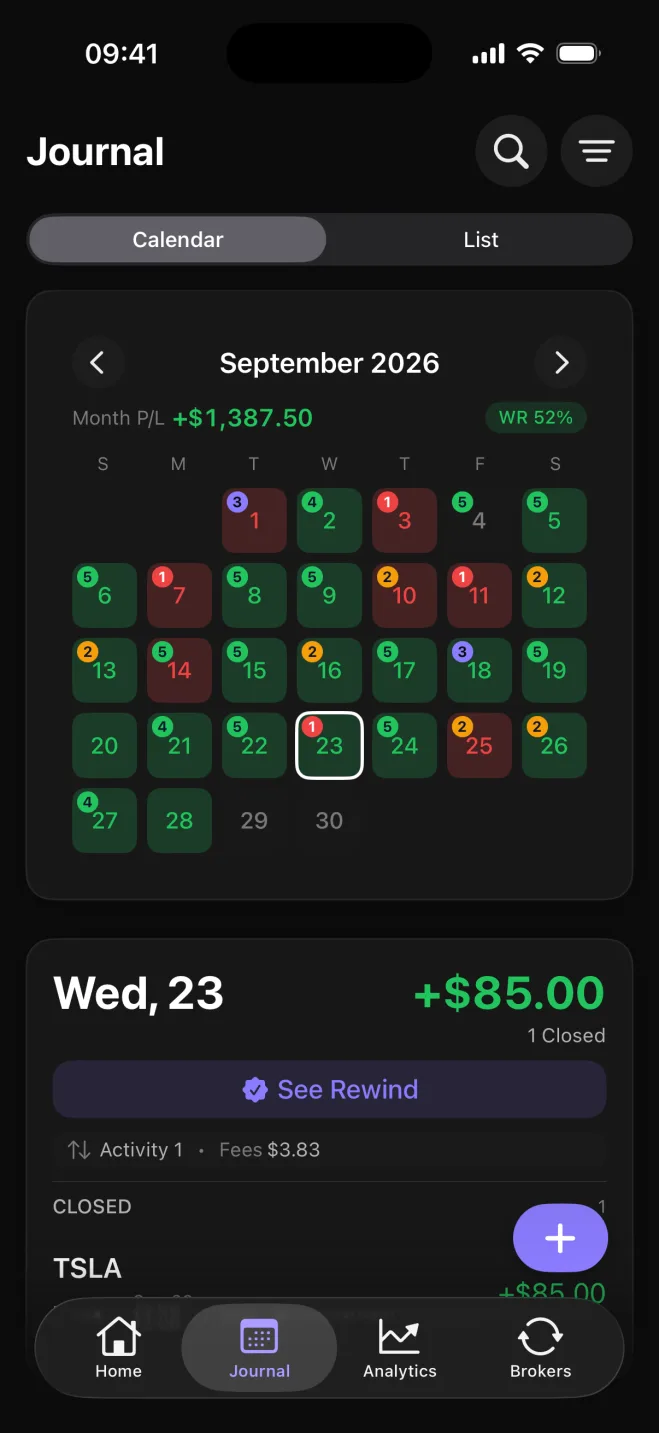
The Journal tab shows that record as a calendar: each day colored by its P/L and trade count, the month's P/L alongside, and any day open to the trades closed on it.
The review tools are free too. A trade can carry a reflection. You pick what drove it from 18 influences: behavior, such as followed plan, revenge, FOMO (fear of missing out) and rushed, or mindset, such as calm, anxious and overconfident. Astro then ranks the influences that come up most, with the net P&L and win rate behind each. Daily Rewind is an end-of-day check-in on the day's closed trades and your own rules. Notes is a rich-text space beside the trade log, with images placed right in the note.
Astro is an iPhone app and a full web app on one account. A trade, note or reflection added on the phone shows up on the web, and both work out the same metrics by the same rules, so the numbers match on either screen.
Premium adds broker and exchange sync and unlimited AI Reviews, with a 7-day free trial on the yearly plan. Every account gets one free AI Review, so you see what a review of your own record looks like before deciding whether more are worth paying for. Connect a broker or exchange and the trades sync into the journal on their own.
What the free analytics tell you
Analytics on the free plan show net and gross P&L, win rate, and average win against average loss. Net P&L is profit and loss after trading costs, gross P&L is profit and loss before those costs, and win rate is the share of closed trades that made money. Once you set a starting balance, drawdown appears too: how far the account fell from its high point.
The account total tells you whether you are up or down. To see why, Astro breaks the same figures down five ways.
Breakdowns, and the question each answers
- Symbol: which markets are carrying the account, and which ones to drop
- Asset class: how your forex, stock, crypto and futures trades compare
- Direction: whether long trades or short trades are doing the work
- Setup: which setup actually makes money, read from the tag on each trade
- Playbook: how named groups of setups compare, side by side
A setup is the pattern or plan a trade was taken on, and you tag it on the trade when you log it. A playbook is a named group of setups, so a breakout playbook and a pullback playbook can be compared on win rate and net P&L side by side.
Astro or a free spreadsheet template?
A free Excel or Notion trading journal template costs nothing to download and leaves the rest to you. You build or adapt the formulas for P&L, win rate and drawdown, keep them working as columns change, and rebuild any breakdown by setup or symbol each time you want to look at it.
Astro works those figures out for you. Log a trade and tag its setup, and net P&L, win rate, average win against average loss and every breakdown update on their own. Drawdown follows once a starting balance is set.
The other difference is where you can use it. A template lives in one file, and editing a spreadsheet on a phone right after a trade closes is slow work. In Astro, a trade logged on the phone at the close shows the same numbers when you review it on a big screen that evening.
Start logging on the free plan
A new account has nothing to analyze yet, and two parts of the analytics need something from you first: drawdown needs a starting balance, and the setup breakdown needs tagged trades.
From a free account to readable analytics
- 1.
Create a free account
Sign up on the web, or download the iPhone app. It is one account on both, so what you log on the phone shows up on the web.
- 2.
Log your trades by hand
Enter each trade in its own market's units: forex in lots, stocks in shares, futures in contracts and crypto in units. Astro works out each trade's P&L from those units, so a futures contract is never valued like a share.
- 3.
Tag each trade with its setup
Name the setup the trade was taken on, and group related setups into a named playbook. The tags are what the setup breakdown and the playbook comparison read, so within a few trades you can see which approach is ahead.
- 4.
Set a starting balance
Enter the balance your account started with.
- 5.
Read the analytics and your free AI Review
Once the first trades are in and tagged, open Analytics.
Every account also gets one free AI Review. A Performance Review reads your last 20 closed trades. Astro computes every figure first and the AI writes the review from those figures, so the review never invents a number, and it ends with one small experiment to try next and the metric to watch.
After that it is a matter of keeping it up: a reflection on each trade, Daily Rewind at the end of the day and notes beside the log, all on the free plan.