Journaling trades: what to write down for every trade, and how to review it
Journaling trades means writing down every trade's numbers and setup, noting what influenced it, then going back over the record by setup to find out which of your patterns actually make money. In Astro Trading Journal, the whole journal is free, with no trade cap, on iPhone and on the web. 1
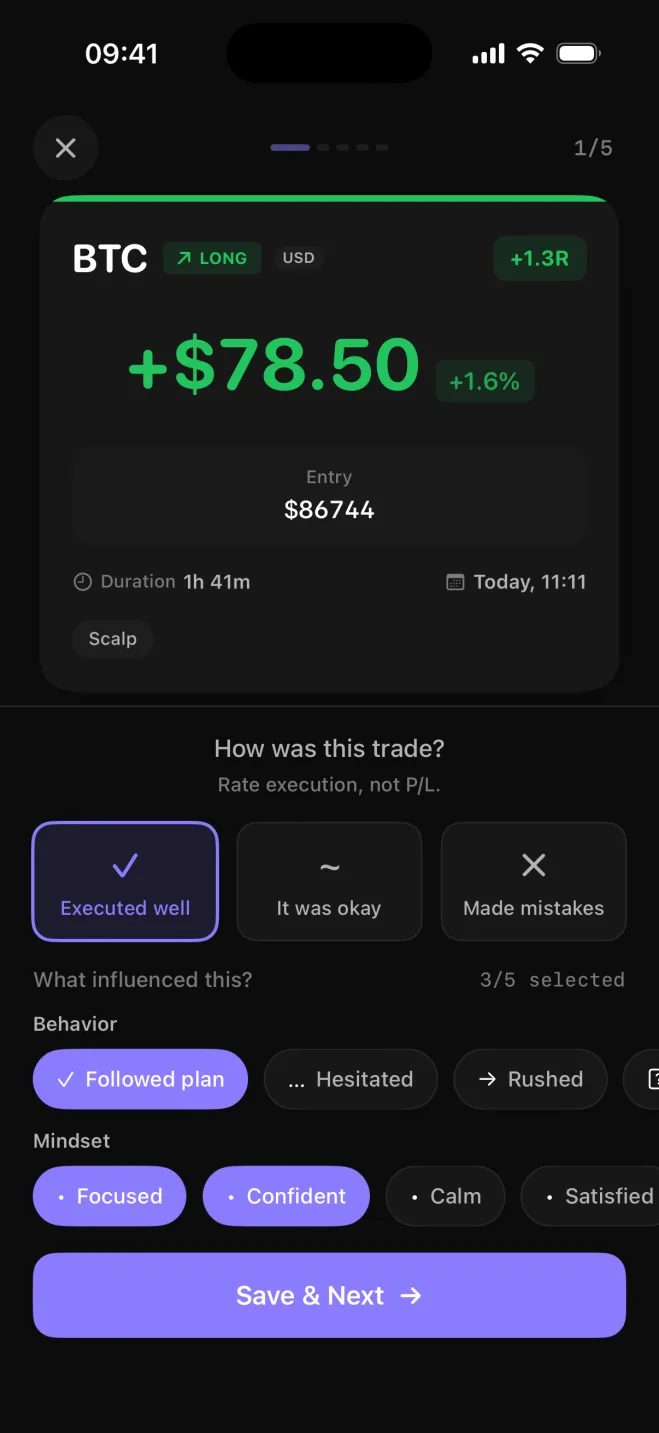
What to write down for every trade
An entry starts with the facts of the trade. Record them the same way every time, so that a hundred entries later they can be added up.
The fields every trade needs
- Market: the symbol you traded, such as EURUSD, TSLA, BTC or ES.
- Direction: long or short.
- Entry and exit: the prices you got in and out at.
- Size: lots for forex, shares for stocks, contracts for futures, units for crypto.
- P&L: the profit or loss once the trade is closed, in the currency it settled in.
- Setup: the pattern or plan the trade came from, such as a breakout, a pullback to a moving average or a reversal at support, written as one short tag.
A trade filed under a setup can be grouped with every other trade of that setup later, so you compare patterns instead of single outcomes.
In Astro you enter each trade by hand with those fields, in the unit its market uses. Astro works out the P&L from the market's contract details, so a futures contract is never valued like a share, and each trade keeps its own currency.
There is no cap on trades. Log on the iPhone right after the close and open the same account in a browser later. A trade you add on one is there on the other, with the same numbers.1
Why you took the trade and how you felt
Write down why you took the trade as well as the numbers: did you follow the plan, or did you enter because a move was running without you? The habit of writing a paragraph after every trade usually fades after a week, so Astro turns it into a pick list.
Any trade can get a reflection, where you tick what was going on from a list of 18 influences. The behavior ones name what you did: followed plan, revenge, FOMO, rushed, hesitated, overtraded. The mindset ones name how you felt: calm, focused, anxious, frustrated, overconfident, tired, fear, greed. FOMO is fear of missing out, jumping in late because the move is already under way, and revenge is the trade taken to win back the last loss. You pick them yourself minutes after the trade, so the record is your own read on it while it is still fresh.
Astro then ranks the influences you pick most often and shows the net P&L and win rate for each. The list shows how often you picked FOMO and what those trades netted together.
How to review your trading journal
Most of the review comes down to three numbers. Win rate is the share of trades that closed in profit. Average win against average loss says how big the winners were next to the losers, which is why a low win rate can still come out ahead. Drawdown is the deepest fall from a peak in the account, and Astro shows it once a starting balance is set.
Astro shows net and gross P&L, win rate and average win against average loss on the free plan, and breaks each of them down by setup, playbook, symbol, asset class and direction. You can see which pattern makes money, and a playbook, a named group of setups, lets you put two plans side by side to see which is doing better. The same split shows which markets to keep and whether your longs and shorts earn the same or one side is paying for the other.
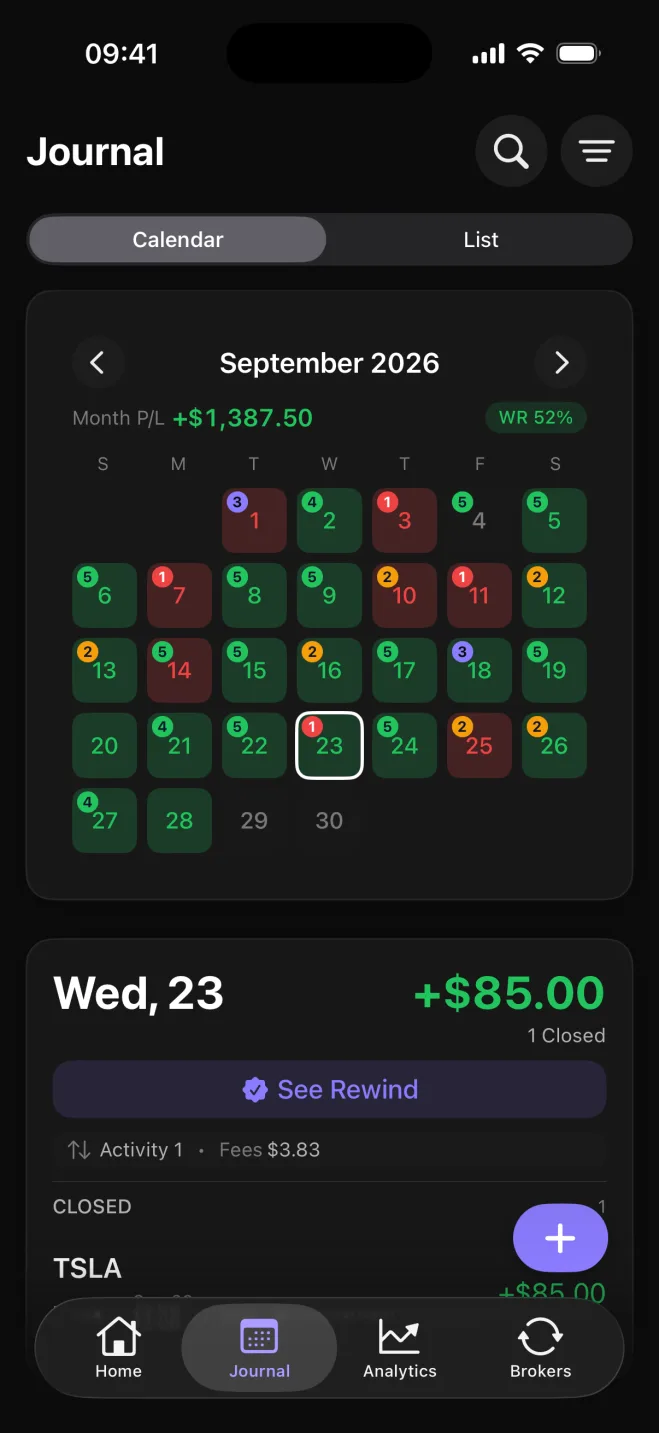
The Journal tab lays the month out as a calendar. Each day is colored by its P&L and shows its trade count, with the month's total at the top. A scan of the month shows where the losses cluster, and one tap opens that day's trades.
Daily Rewind is a short check-in at the end of the day. It walks through the day's closed trades that have no reflection yet and asks how closely you followed your plan, from off plan at 1 to fully followed at 5. You also mark each of your own rules as followed, partly followed or broken. After you save, it can point out a repeated influence in your recent trades, or a rule you have marked followed or broke for several days running. The check-in also shows which of the recent days you have reviewed.
Notebook, spreadsheet or app: where to keep the journal
Keep the journal somewhere those totals are easy to pull together: which setup earned, which influence lost and how deep the drawdown went, across fifty or a hundred trades. If working that out takes an evening with a calculator, it tends not to happen.
A notebook is the easiest to start, and it is fine for writing down why you took a trade and how you felt about it. It won't add anything up for you, though. To know your win rate by setup you reread every page with a calculator, so the review happens once, if at all.
An Excel template can total P&L and win rate once the formulas are built, and plenty of traders start there. Ranking influences by their P&L, tracking drawdown from a running balance, and comparing two playbooks all take more formulas to build and keep from breaking. A spreadsheet is also an awkward place to type on a phone right after a trade.
| What the review needs | Notebook | Spreadsheet template | Astro |
|---|---|---|---|
| Stats by setup, symbol and direction | Reread and tallied by hand | Formulas you build and maintain | Built in, free |
| Influences ranked with P&L and win rate | Not possible | Hard to build | Built in, free |
| Drawdown | Not tracked | Needs a running balance column | Shown once a starting balance is set |
| Phone to log, big screen to review | Notebook only | Awkward on a phone | iPhone and web on one account, matching numbers |
| Cost of the full journal | The price of a notebook | Free templates, or the spreadsheet app's price | Free, with no trade cap |
If you go with an app, four things are worth checking before you settle on one. It should take every field above by hand, with no cap on how many trades you can log. You should be able to pick the influences yourself, and it should rank them with the P&L and win rate for each. It should show which patterns and markets made money, and how longs compare with shorts, rather than showing one total for the account. And the numbers on the phone where you log should match the ones on the screen where you review. Astro does all four on the free plan.1
Premium adds broker and exchange sync, so fills from MetaTrader 5, TradeLocker and the supported crypto exchanges arrive in the journal on their own. It also adds unlimited AI Reviews. Astro works out the numbers before it writes the review, then leaves you with one small experiment to try next and the metric to watch. Every account gets one AI Review free.1
Sources
- 1.Astro Trading Journal, “Astro Trading Journal Pricing,” tradingastro.com