Daily Trading Journal: Log Each Trade, Then Close the Day with a Short Review
A daily trading journal is where you log each trade the day it happens, then close the day with a quick review of how well you followed your plan. In Astro Trading Journal, that review is Daily Rewind, a free end-of-day check-in on iPhone and on the web.
What you do in the journal each trading day
The end-of-day check-in, in order
- 1.
Log the day's trades
Add each trade on the day you take it, in the iPhone app or on the web. Both share one account, so the list you review at the close is the same on either screen.
- 2.
Open Daily Rewind at the close
It brings up today's closed trades that have no reflection yet.
- 3.
Reflect on each of those trades
For each one, choose what was behind it from 18 behavior and mindset influences, such as "followed plan", "revenge" or "frustrated".
- 4.
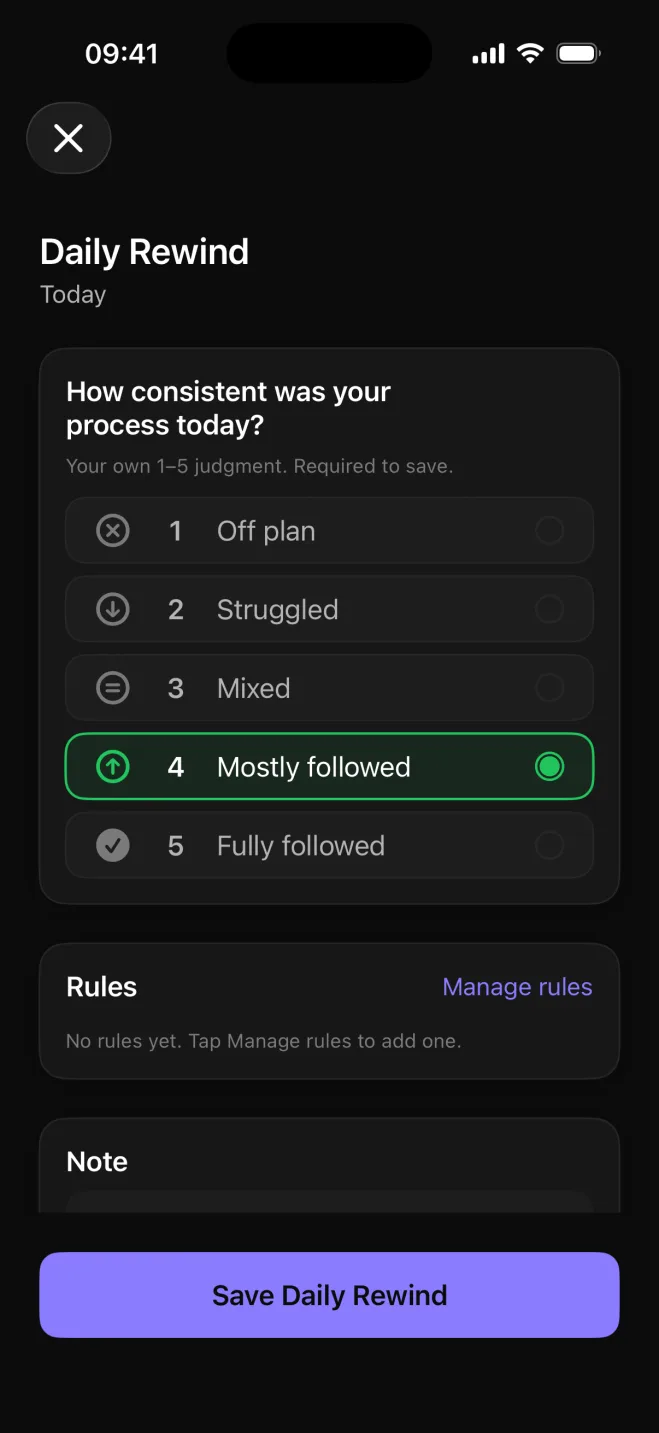
Score the day from 1 to 5
Rate how closely the day followed your trading plan, from 1, Off plan, to 5, Fully followed.
The score is your own judgment of your process, so a losing day where you followed every rule can still earn a 5.
- 5.
Mark each of your rules
Daily Rewind lists your own trading rules. Give each one a mark: followed, partly or broke.
- 6.
Save and look at the strip
After saving, Daily Rewind can point out one pattern it noticed in the day. A strip of recent days shows which ones you have reviewed, so a gap is visible as soon as you open it.
Once the trades are in, the check-in takes a few minutes.
The 18 influences you pick for each trade
One group covers what you did, the other how you felt.
Behavior and mindset
- Behavior influences, such as followed plan, revenge, FOMO, rushed, hesitated and overtraded.
- Mindset influences, such as calm, focused, anxious, frustrated, overconfident, tired, fear and greed.
Revenge is when you took the trade to win a loss back. FOMO means fear of missing out: you got in because the move was already running without you.
Astro ranks the influences that come up most often across your trades and shows the net P&L and win rate behind each one.
If frustrated is near the top and the net P&L beside it is negative, that mood is worth watching.
Notes for prep, charts and the weekly look back
Some of what you want to write each day belongs to the day rather than to one trade: the levels you are watching before the open, a chart you want to keep beside the thought you had about it, a Friday look back over the week. In Astro that goes into Notes, a journal space beside the trade log.
Notes has a rich-text editor with headings and lists, and images are placed right in the note, so a chart screenshot sits next to the sentence that explains it. Notes live on the same account on iPhone and on the web, so market prep typed at the desk is on the phone when the session starts.
Do you need a Notion or Excel template?
A daily template in Notion or Excel can hold a trading journal, and many traders start with one. You have to build the structure yourself, though: decide what a day's entry should contain, then fill in the same fields every evening with nothing prompting you to do it.
Daily Rewind has that structure built in. It brings up only the trades that still need a reflection, asks for one score against your plan and lists your own rules to mark, so the check-in is the same every day.
The strip of recent days shows whether you kept the check-in going. Skip an evening and that day stays unmarked on the strip.
What the daily routine costs
Everything in this routine is on Astro's free plan: manual trade entry, trade reflections, Daily Rewind and Notes. There is no cap on the number of trades you log, on iPhone or on the web.
Premium adds broker and exchange sync, so trades from a connected broker or exchange arrive in the journal on their own. It also adds as many AI Reviews as you want. Every account gets one AI Review free, and the yearly Premium plan starts with a 7-day free trial.
Astro is a free download on the App Store for iPhone.1
Sources
- 1.Apple App Store, “Astro Trading Journal for iPhone on the App Store,” apps.apple.com