Trade log software for a record of each trade on your computer
Trade log software keeps a record of each trade.
What each trade record holds
Astro Trading Journal is trade log software that runs in the browser on your computer. It is also an iPhone app on the same account.
A trade, note or reflection added on the phone shows up in the browser. Both work out the same metrics by the same rules, so the numbers match on the web and on the phone.
Parts of one trade record
- The trade
- Its P&L
- The setup or playbook it followed
- A reflection on what influenced it
- Notes kept in the same journal
A setup is the approach you tag on the trade, and a playbook is a named group of setups. For a reflection, you pick what influenced the trade. Notes are a space beside the log, with headings, lists, formatting and images, so a chart can sit next to the thought behind it.
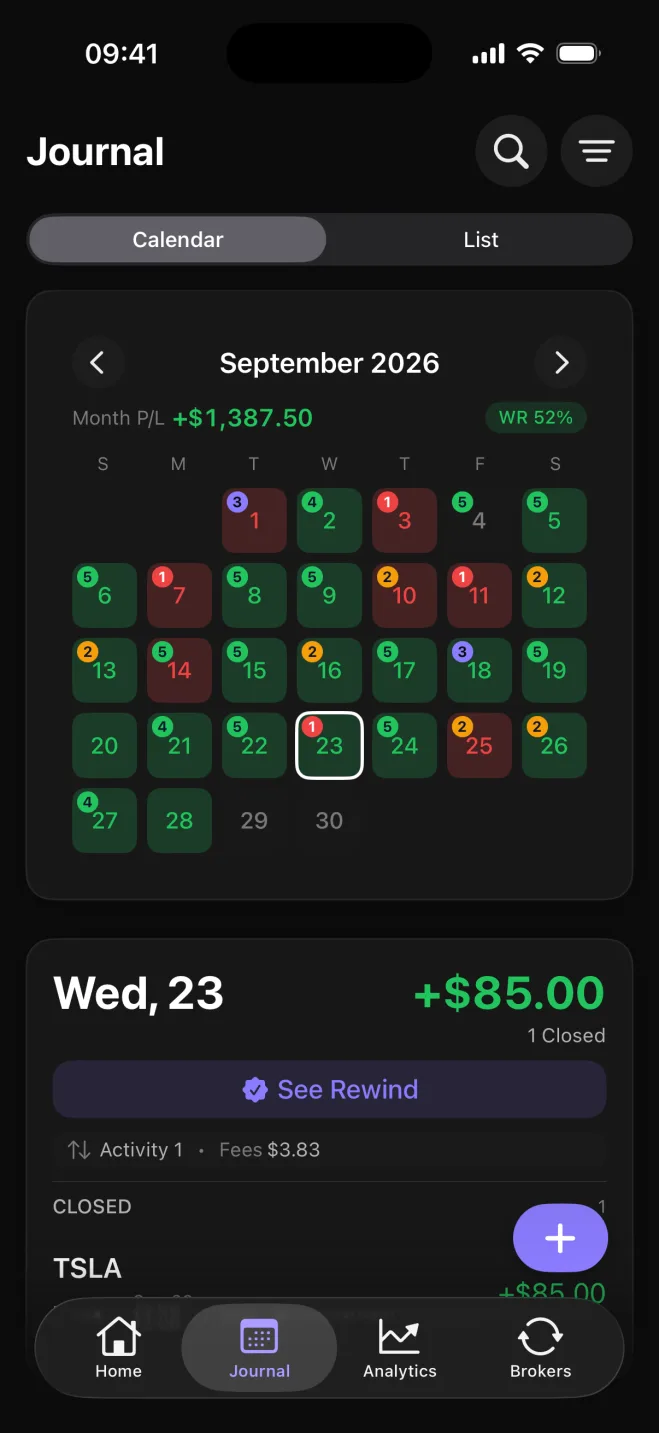
On the Journal tab, the September 2026 calendar colors each day by P/L and trade count. The month P/L is +$1,387.50, and Wednesday the 23rd shows a closed TSLA trade at +$85.00.
The free plan is the whole journal, with no cap on trades. Manual entry, analytics, setups and playbooks, trade reflections, Daily Rewind (an end-of-day check-in) and notes are included, on iPhone and on the web.
How a trade gets into the log
You can type each trade on the free plan. You can also connect a broker or exchange so the trades sync into the journal on their own. Broker and exchange sync is a Premium feature.
MetaTrader 5 and TradeLocker connect on iPhone and on the web. One TradeLocker login can bring in several trading accounts.
Binance (spot and futures), Coinbase, Kraken, Bybit, OKX, BingX and Robinhood Crypto connect in the iPhone app with read-only API keys, so the journal can read the trade history. Those trades then show on the web.
Interactive Brokers is coming soon.
The P/L calendar, analytics, and Daily Rewind
The calendar colors each day by P/L, so you can find a winning or losing day, open that day's trades, and read the records.
Analytics show net and gross P&L, win rate, and average win against average loss.
Drawdown appears once you set a starting balance.
Results break down by symbol, asset class, direction, setup and playbook. Setups are grouped into named playbooks that you can compare side by side, which shows which setup made money in the record.
A reflection is where you pick what influenced the trade, from 18 influences. Behavior ones include followed plan, revenge, FOMO (fear of missing out), rushed, hesitated and overtraded. Mindset ones include calm, focused, anxious, frustrated, overconfident, tired, fear and greed.
Astro ranks the influences that come up most and shows the net P&L and win rate for each.
Daily Rewind is an end-of-day check-in. You go through the day's closed trades that have no reflection yet, rate how well the day followed your plan from 1 (Off plan) to 5 (Fully followed), and mark each of your own rules as followed, partly followed, or not followed.
After you save, it can point out that the same influence keeps coming up on your recent trades, or that you have followed or broken the same rule for several days in a row. A strip shows which recent days were reviewed.