Trade tracking software to follow results on your computer
Trade tracking software from Astro Trading Journal runs in the browser on your computer, where you log trades and follow your results over time for free.
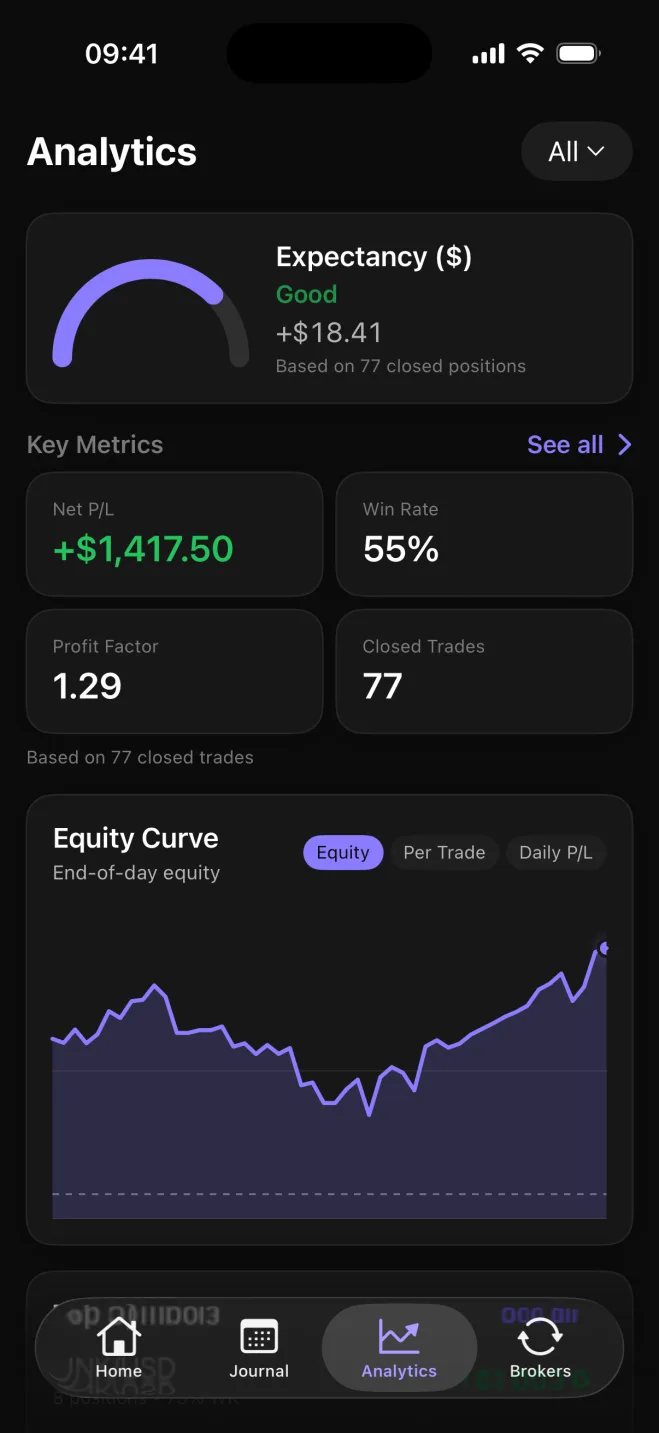
What the Analytics tab shows over time
Every closed trade you log feeds the Analytics tab. There you see net and gross P&L (profit and loss), win rate and average win against average loss.
Win rate is the share of closed trades that made money. Drawdown appears once you set a starting balance.
The Analytics screen here covers 77 closed trades: expectancy of +$18.41, net P&L of +$1,417.50, a 55% win rate, a profit factor of 1.29, and an equity curve. Expectancy is the average result per closed trade. Profit factor compares total gains with total losses, so 1.29 means gains were larger than losses.
Results then break down by symbol, asset class, direction, setup and playbook. Direction means long trades compared with short trades. A setup is a tag you put on a trade, and you group setups into named playbooks you can compare side by side.
What each breakdown answers
- Symbol: which market is ahead on net P&L
- Asset class: how forex, stocks, futures and crypto compare
- Direction: how long and short trades compare
- Setup: which tagged approach is ahead
- Playbook: how named groups of setups compare side by side
That comparison is how you see which trades keep paying and which markets to drop.
Free journal, with broker sync on Premium
On the free plan you type each trade in yourself. You get the whole journal, with no trade cap: manual entry, analytics, setups and playbooks, trade reflections, Daily Rewind and notes, on iPhone and on the web.
Premium adds broker and exchange sync, so trades arrive without typing, plus unlimited AI Reviews of your own record. Every account gets one AI Review.
MetaTrader 5 and TradeLocker connect on iPhone and on the web, and one TradeLocker login can bring in several trading accounts. Binance spot and futures, Coinbase, Kraken, Bybit, OKX, BingX and Robinhood Crypto connect in the iPhone app with read-only API keys, and those trades show on the web too.
Stocks, futures, forex and crypto in one journal
Each trade is recorded in the size unit that market uses. A futures contract is never valued like a share, and each trade keeps its own currency, so several markets can share one journal.
| Market | How size is recorded |
|---|---|
| Forex | Lots, with the symbol's contract size |
| Stocks | Shares |
| Futures | Contracts with a point value |
| Crypto | Units, including fractional sizes |
| Stock and futures CFDs (contracts for difference) | Contract size |
The asset-class breakdown in Analytics then compares those markets on the same record.
On your computer and on iPhone
The full tool runs in the browser on your computer, so you can review results on a large screen.
The same account works in the iPhone app for logging during the day. A trade, note or reflection added on one shows up on the other, and both work out the metrics by the same rules, so the numbers match.