Trading journal app for iPhone and the browser
Astro Trading Journal is a trading journal app that lets you log each trade on iPhone and review it in the browser on one account, and the figures match on both.
Log each trade by hand
You enter each trade by hand. Astro records each market in its own units: forex in lots, stocks in shares, futures in contracts, and crypto in units, including fractional sizes. P&L (profit and loss) is worked out from that record, so a futures contract is not valued like a share, and each trade keeps its own currency.
You can add a reflection on the trade by picking what influenced it: behavior such as followed plan, revenge, or FOMO (fear of missing out), and mindset such as calm, focused, or anxious. Notes sit beside the trade log.
The same journal on iPhone and in the browser
Astro is an iPhone app and a full web app in the browser, on one account. You log a trade on the iPhone after the session, then open the same journal in the browser when you want a larger screen for the review.
A trade, note, or reflection added on one shows up on the other. The web and the phone use the same rules, so the figures match.
Results by market and by setup
Analytics show net and gross P&L, win rate, average win against average loss, and drawdown once you set a starting balance.
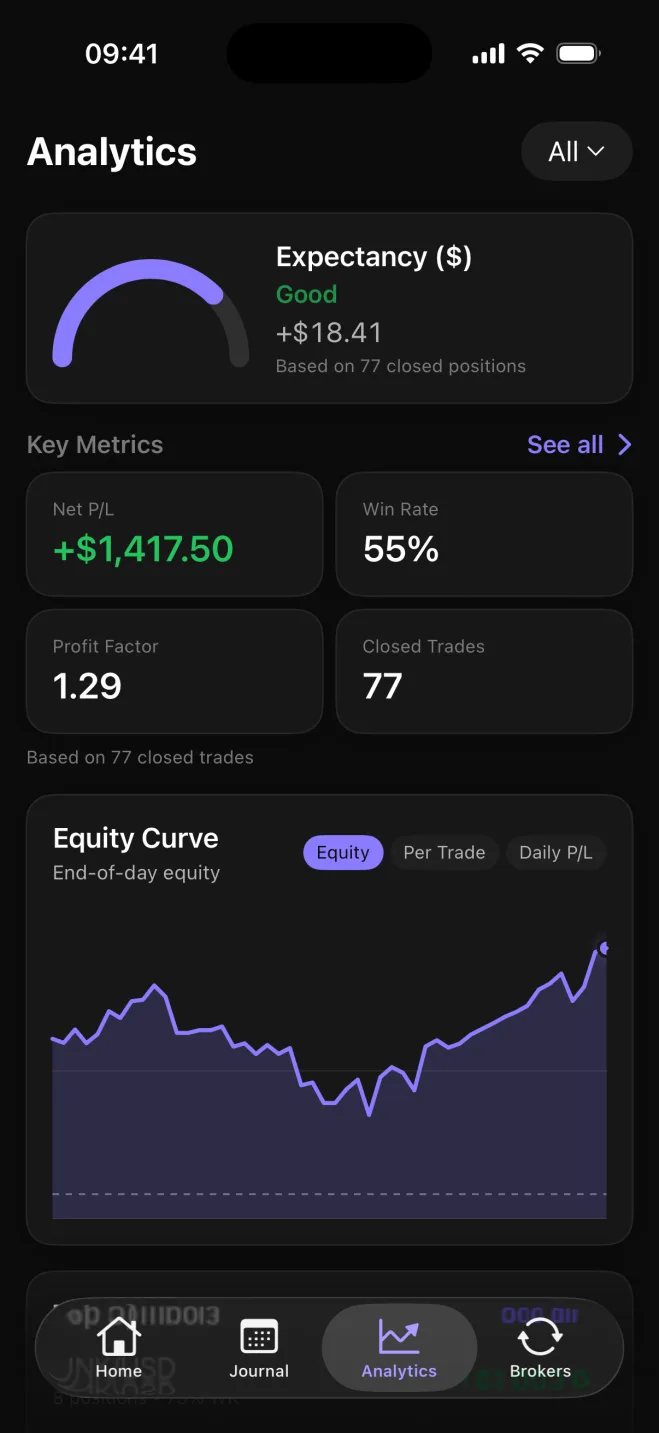
The Analytics tab shown here is a review of 77 closed trades: expectancy +$18.41, net P/L +$1,417.50, a 55% win rate, profit factor 1.29, and an equity curve.
The same results break down by symbol, asset class, direction, setup, and playbook. You tag a setup on a trade, group setups into named playbooks, and compare those playbooks side by side.
What each breakdown shows
- Symbol: each market on its own, so you can see which one is ahead and which to drop
- Asset class: forex, stocks, crypto, and futures as separate groups
- Direction: long trades set against short trades
- Setup: the tag on a trade, so you can see which approach is ahead on net P&L
- Playbook: named groups of setups, compared side by side